
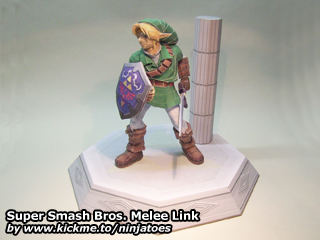
031006 Super Smash Bros. Melee Link (June 12, 2007)
from: Super Smash Bros. Melee video game / size: ± 19,5 cm
Download:
parts with fold lines (3,16 MB PDF file)
parts without fold lines (3,06 MB PDF file)
display stand (4,54 MB ZIP file)
instructions (3,34 MB ZIP file)
some extra help on Melee Link’s boot: 1
Pictures:
Google Photos
 Ninjatoes' papercraft webpage
thank You !!! Whats your name and where do You live
No prob! I’m from the Netherlands, and you can just call me ninjatoes! ;o)
inj
when yyou have no time to make a prince of persia model then is it okay
but with what programm do you make papercraft models?
(I have make the Eagle sword and the lion sword:=)
The process of making a good papercraft model that is fun to build out of 3D models like the ones from Prince of Persia is very time consuming…
To rebuild a simplified 3D model, I almost always use a software called “Metasequoia” (http://www.metaseq.net/english/index.html) and once the 3D rebuilding is done, I use a program called “Pepakura Designer” (http://www.tamasoft.co.jp/pepakura-en/) to unfold the 3D model into 2D parts.
SSB:M Link is one of my toughest models I think, so I’m glad to hear you like it!
I have many more ideas for future projects, and Prince of Persia is a nice game… ;o) But I can’t promise anything, because I’ll never have enough time to make all the paper models I’d like…
There is one Prince of Persia papercraft model that I know of though, but it’s not a character, but the Eagle sword: http://icthus7-papercraft.blogspot.com/2008/10/espada-aguila-del-prince-of-persia.html
Are you absolutely sure you downloaded the correct package from the official Metasequoia website? MetasequoiaLE R2.4 mqle24.zip (4.05MB) FREEWARE
It’s the bottom link of the first “DOWNLOAD”, right above the “OLD VERSIONS”.
It’s the latest version of the free LE version. All the Metasequoia specific DLL files that are needed to run the program, are included in the ZIP-file, including mqrend.dll.
After downloading the ZIP-file, let it automatically unpack everything in the same folder, and Metasequoia should automatically detect everything it needs.
ok, just one more thing. I can’t email you because i forgot my email password, (so sad for me) and when I run the Metaseq.exe, it says the app has failed to start because MQREND.DLL was not found. What does that mean? Now, unless another problem arises, I’ll leave you alone. Until, I can let you see my Ozzy model.
Controlling the size is a piece of cake, after you have unfolded the model in Pepakura Designer, you can set the exact size you want the model to be (2DPattern menu -> Scale up/down development by specifying size (or something like that ;o)
Metasequoia is a very small and simple 3D app. You don’t even have to install it, you can just unpack it and run the executable (Metaseq.exe). The rest are just configuration files that remember your favourite settings and things like that and some *.dll files to make the program work. The rest are example models and textures, so you can see some of the things you can do with the program (you did download the MetasequoiaLE R2.4 mqle24.zip (4.05MB) FREEWARE package, right? ;o)
(btw, in the future it’s best to contact me through e-mail with questions like these, otherwise the comments here would quickly get out of control… ;o)
Thanks, I will have fun, but I have one more question for you. How can you control the model’s size? I want my Ozzy model to be about the size of your Ganondorf.
Also, the Metaseqoia freeware. When I downloaded it, it gave me this weird ZIP file with just pictures and other things. Is something wrong with it?
what 3d app would you recommend, as long as its free. I have A LOT of free time on my hands. (that’s why i’m trying to do this instead of wating for you to)
I use Metasequoia myself, the LE edition is freeware, but of course it doesn’t have all the functions of the shareware version.
SketchUp also has a free version, and it’s very easy to learn. Making advanced models is more difficult in SketchUp than in other 3D apps, though, *because* it’s so easy to use. ;o)
Many people also use Blender, but there are really a lot of simple, free 3D apps out there.
If you never used a 3D app before, you should browse and try around a bit, to see which one you like and can easily learn. That’s more important than the program having a lot of advanced options if you’re only going to use it to create 3D models to make into papercraft models. ;o)
Good luck and have fun!
How do you do this, I mean look at this model: it’s the most detailed thing i have ever seen! I was wondering how you design these models. Would it be easier to do it on actual people or video game characters? What programs do you use? Are they free? I have so many questions for you and it would be great if you answered them. (or at least most of them)
PS: I had in mind designing Ozzy Osbourne, Ted Nugent, Joe Perry, and maybe for someone else (no one needs to know who she is) Hayley Williams. Tell me if I’m getting ahead of myself!!
My “digital” models are all made with the help of Pepakura Designer. There’s a shareware version which is free, but it won’t allow you to save or export your work (you *can* print your work with the shareware version).
There are many freeware 3D applications that you can use to create a 3D model of Ozzy or edit an existing one to prepare it to be unfolded with Pepakura Designer.
It requires a bit of logical thinking and planning, but most of the times it’s not really difficult to create a paper model using a 3D app and Pepakura Designer, it’s just really time consuming… ;o)