
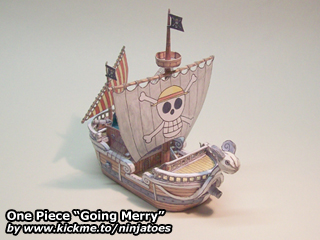
007002 One Piece “Going Merry” (August 6, 2004)
from: One Piece anime series / size: ± 14 cm x 5,5 cm x 13,5 cm
Download:
parts (878 kB ZIP file)
instructions (1,04 MB ZIP file)
Repaint by chiohunpp (?):
parts + instructions (3,00 MB ZIP file)
Mini Merry bonus (1,82 MB ZIP file)
Pictures:
Google Photos
 Ninjatoes' papercraft webpage
i want to try this, amazing
Thank you for the compliment, I’m glad you like it! ;o)
You can download the parts and instructions to print and make it yourself. Many of the parts are very small, so it’s not a very easy model, but if you’re careful and take your time and fold and shape each part properly before glueing them together, I’m sure you can do it!
Have fun!
hello!
I’m look for a 3d model of the going merry, anything can help me, it’s for a crazy proyect in RC model. Have you this model in a 3D render or plans to help me?
I think this can be cool in RC
The paper model I made was all done by hand, so I didn’t use a 3D model. One Piece is a very popular anime though, so I’m sure that if you search around a bit, you will be able to find 3D models of the “Going Merry”, but I don’t know if they will be free to download…
thankyou i`am korean
I’m glad you like my papercraft “Going Merry”! I made it by hand with water colours and they turned out really nice I think, it looks just like real wood. ;o)
any other model?
The “Going Merry” is the only One Piece model I made so far, but I might make some more in the future; either more ships, or even some characters, but I can’t promise you when I’ll get around to it I’m afraid… ;o)
There are many more papercraft websites out there, though, and some of them already made some of the Strawhat Crew (and other characters). You can find some of them here, or simply with Google!
I hope you’ll find one you like, have fun building!
thx alot! its working now. it was my temporary internet probem but its okay now. can i ask how u make this papercraft stuff? using the kind of 3ds software? u havent make the thousand sunny ship have u?
I’m glad to hear that! ;o)
Sometimes I make my papercraft models by hand, like this “Going Merry”, but often I also use a program called Pepakura Designer, which allows you to unfold a digital 3D model into a 2D papercraft template.
I haven’t made any other One Piece ships yet, though…
hello dude. im so happy found that ship can be created by paper craft. i like handmade stuff better than factory plastic toy. :D but when i was trying to download the file. it cannot be start. could u upload that to other filehoster? many thx for sharing.
Hi! The downloads for my models aren’t hosted on a seperate filehost, but on my own personal webspace, so people won’t have to use captcha codes or wait for the downloads to start.
The links seem to be working fine: please try emptying your internet cache and your temporary internet files, then close and restart your browser and try again, to make sure your browser isn’t trying to access a temporary, offline version of the site.
The files should start downloading automatically when you click the links, but if they don’t, try right-clicking them and then choose “Save as…”
The files for the “Going Merry” are packaged as ZIP-files, so you will also need a unzip-utility (like 7-Zip for example) to open them.
I hope this helps, but if it doesn’t, let me know by e-mail.
Hello!
Im half way on my ship and its a disaster! Haha!! I used “normal” paper and its waaay too thin :S. It kinda shrink when I put glue on it so the pieces dont really fit together.. So my ship is all wrinkly and stuff..
The back of the ship is the worst part! And after fitting part 14 the deck it just became very clear to me that this ship will look like shit! :P But hey its my first try.. Think that I will do this all over again but with thicker paper..
is it possible to print out the parts but make them bigger? Or will that just mess everything up?
I’m sorry to hear that…! I always use pretty thick paper myself, and it makes the final paper models very strong. So if you feel that the paper you are using now is too thin, it might definately help to use thicker paper.
The “Going Merry” really is a small model, and of course that also adds to the difficulty. ;o)
It shouldn’t be a big problem to print everything bigger, but there are basically two ways you can do that: you could either just set the print setting to a larger scale and print it on bigger paper…
…or you can enlarge the templates first, and cut them up in an image editing program to fit on regular sized paper. That’s how most people do it, and as long as you make sure that the parts don’t get distorted (don’t scale them differently horizontally than you did vertically) and as long as you scale all the pages the same (don’t scale one page 150% and the other one 200%) all the parts should still fit together.
Some parts probably won’t fit on one page anymore, so you will need to cut them up when you’re making the scaled up templates, and glue them back together again after you have cut them from the paper, but that shouldn’t be a big problem. ;o)
Good luck and have fun building!