
January 4th 2025 I had a big stroke…
I lived, but have to go through a long recovery
to see what I can still do in the future…
Hopefully it will be a lot…! 👍 Always keep having fun papercrafting!
Which papercraft model would you like to build?


“What’s papercraft?” you ask?
Well, that’s when (in this case ;o) you download and print a page of 2D parts (preferably on some thicker paper) cut them out and fold them, and then glue them together to make your very own 3D paper model of your favourite game/anime/movie character/whatever you like!
There are a lot of websites where you can find free templates to download and build, including my own one of course which you’re visiting right now. ;o)
Currently, I have two-hundred-and-thirty-seven (237!) free papercraft models in stock for you! :o) Select one of the Download categories above or in the Site map to the right to find the model you wish to download (if it’s not in one of the obvious categories, try the miscellaneous section).
If you want to contact me, or send me a picture of your finished paper model for the hall of fame, you can send me an e-mail at ninjatoes@home.nl and I’ll get back to you as soon as I can. Have fun building!
 Ninjatoes' papercraft webpage
good afternoon,
Do you have the Sanrio papercraft? (。 ^ ▽ ^)
I am missing some (cinnamoroll, badzt maru, kuromi, etc)
please
(I am using google translator)
Hello! I think you mean the papercraft characters from the official Sanrio website from a few years ago, right: https://www.sanrio-ponponjump.com/programs/craft/?
Unfortunately they were part of sort of a summer campaign, and when the campaign ended, the papercraft download links were gone too…
I described in a blogpost how I managed to find download links for 11 of them (there where 22 in total, each week or so a new one replacing the earlier one) using the Wayback Machine:
https://ninjatoes.blogspot.com/2018/10/free-official-supercute-sanrio-hello.html
You can scroll down and still download some of them, but especially the ones you mention, I couldn’t find working download links for after the campaign ended unfortunately…
I’m sorry I couldn’t help you, maybe you will find one or two that work and that you still don’t have so you can still get them. And don’t give up looking and asking around online from time to time, they were veru popular so there’s a good chance Sanrio fans saved the complete set and would be willing to share them! Or maybe you can even ask the Sanrio company through their website explaining your question?
Good luck and have fun!
UPDATE
Check the post I mentioned with the list of Sanrio papercrafts I mentioned earlier, hopefully it’s a nice surprise:
https://ninjatoes.blogspot.com/2018/10/free-official-supercute-sanrio-hello.html
(I kept trying with the Wayback Machine, and tried changing the numbers links from the working Wayback ones (because the the download links were basically just renumbered each time during the campaign; it worked for almost all of them, except the first one, but I hope you’ll like all the other ones that you can still download now including the ones you were looking for! ;o)
Hey Hey, i saw that you made on amazing Walrus class submarine in cad? I have a teacher that is retiring who went and worked on 3 sub classes and I would really like to 3D-print the model for him because of this. i was wondering if you could help me out with the STL file?
Kind Regards,
Damian
Ah I actual did model it in 3D in SketchUp first, but only to unfold it into 2D parts with Pepakura Designer to make it into a papercraft, and I only kept the 2D papercraft parts to share on my website here… Pretty much all I have for you now are the papercraft files you can download here: https://ninjatoes.wordpress.com/2014/03/02/royal-netherlands-navy-walrus-class-submarine/ sorry… :o(
But what I did at the time was order an official scale model drawing of the Walrus submarine class from the ministry of Defence: https://www.defensie.nl/onderwerpen/modelbouwtekeningen/bestelformulier
It’s €15 including shipping to an adress in The Netherlands, and you’ll get the drawing you see in the background of this photo:

I scanned it (it’s a big drawing so I had to scan it in pieces and then “stitch” it back together in Photoshop, but for a fee you could also have it scanned at a print shop) and then I imported all the views and cross-sections in the same scale into SketchUp so I could basically “trace” all the shapes and parts from the drawing like you can see in the top-left panel of this image:
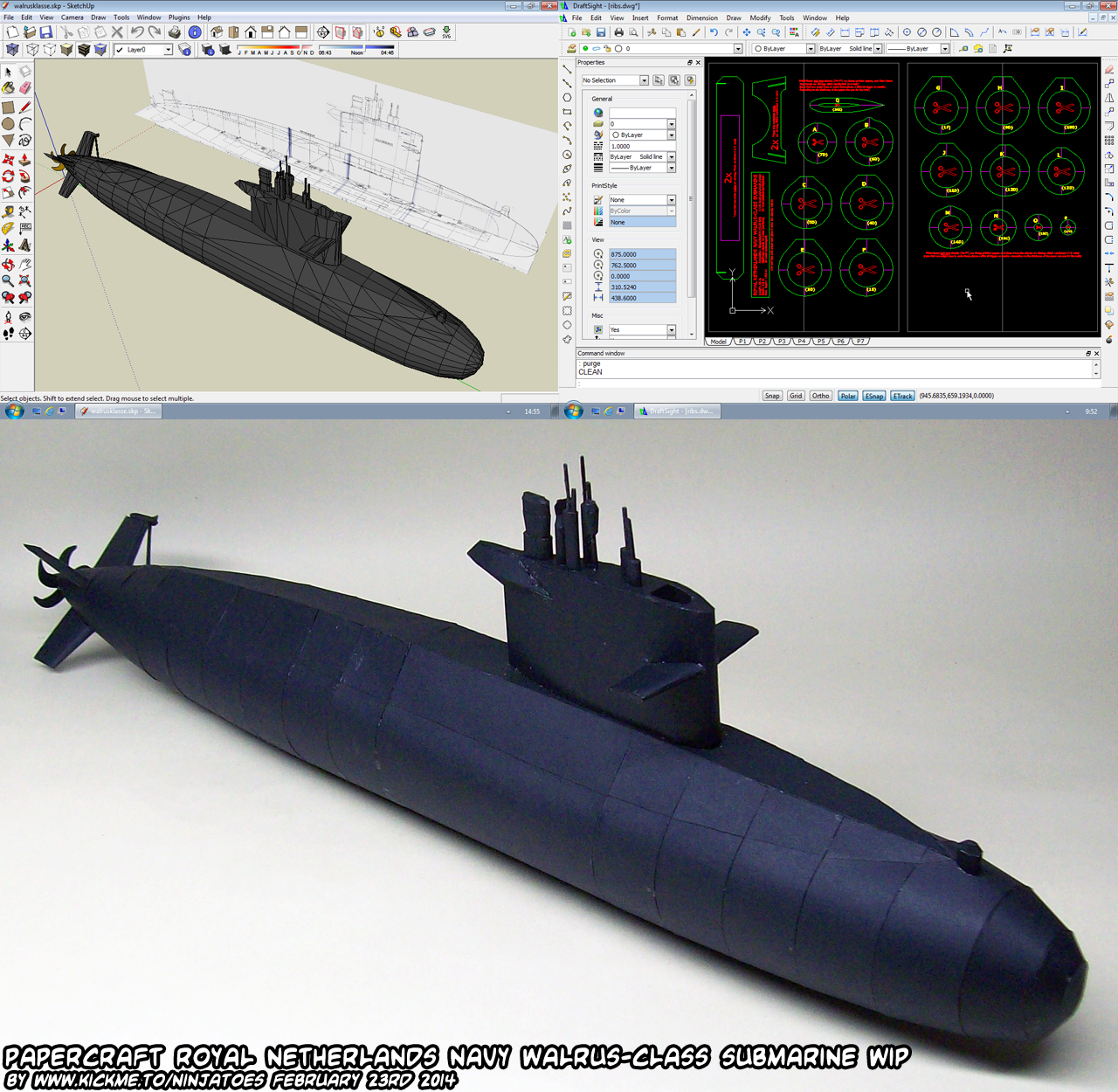
Because I was making it into a papercraft my version wasn’t 100% accurate but it actually wasn’t too difficult making the 3D model using the scanned drawings as guides! :o) If you want to 3D print it, I think there are tools/plugins that will let you convert a SketchUp file into an .stl file…?
I’m very sorry that I can’t help you better than this, but I hope maybe it’s an idea to try to do it the same way…?
Thank you very much for taking the time to explain this to me. However I think I will make a papercraft version for myself just for fun. And maybe buy the official replica of the site you recommended for my teacher. Again thank you very much!!!
I hope you’ll enjoy building the papercraft! Like all papercrafts, some parts can be quite tricky so take your time and have fun!
And I hope I didn’t explain it in a confusing way, but the modelbouwtekeningen that you can buy from het Ministerie van Defensie are just that: referentie-tekeningen van de boten, *geen* modellen of replica’s van de boten helaas…!
I was thinking aboit making a model but i couldn’t find it anywhere so i thought i would make it myself.
Just one problem…
I Don’t know how to make templates.
I was hoping you you could give me some advice :p
Well it can be as easy or as difficult as you want, actually! ;o)
Sometimes I make the papercrafts / templates just by hand; I just try to break down a complex shape to simpler shapes in my head, and then try to imagine what that 3D part would look as a 2D papercraft part like when you unfold it, and then I draw that 2D shape on a piece of paper. Usually I have to fix it a bit (it’s a bit trial and error usually;o) but I make my Advance Wars papercrafts that way, and some other ones like the Batmobile, Going Merry boat, Star Wars TIE Fighter or more recently a Star Trek shuttlecraft. I can’t really make a dedicated tutorial or anything, but on my papercraft weblog you can see work in progress posts that show what I mean:
https://ninjatoes.blogspot.com/search/label/Advance%20Wars
https://ninjatoes.blogspot.com/search/label/Star%20Trek
Most people that get into papercraft nowadays though like to use a program called Pepakura Designer: https://tamasoft.co.jp/pepakura-en/
It can take a digital 3D model, and then the tool will unfold it into 2D parts to make a papercraft template. The unfolding is actually the easy part that way, the hardest / most time consuming part is making the 3D model. You can use existing ones, or make your own of course, and they can be as complex / detailed or as simple as you want too!
3D modelling is a whole art in itself, but for papercraft you really don’t need very complex 3D models (it will only make the papercraft difficult to make too – although maybe you like challenging papercrafts? ;o)
The real “trick” is to just take your time playing around and learning the possibilities by making your own templates, and of course building papercrafts too! That way you get to learn using the 3D tools (you can use almost any (free) 3D program you like, and they all have their own options and for most of them you can find a lot of tips and tricks online already) and things that work well and not so well for a papercraft model.
If you look at some of the work in progress posts on my weblog again for the paeprcrafts that I made using Pepakura Designer, you can see some of the things I like to do; usually I like to break down combined shapes into simpler, separate ones, but that’s just me really. To be honest, it’s really just a personal choice how you should make a 3D model that you want to unfold in Pepakura Designer; like I said, you can make a very simpel 3D model for a very simple papercraft, or a very detailed one for a very challenging on.
https://ninjatoes.blogspot.com/search/label/Work%20In%20Progress?updated-max=2020-12-25T10:44:00%2B01:00&max-results=20&start=13&by-date=false
https://ninjatoes.blogspot.com/2012/06/papercraft-lego-black-knight-wip4.html
Like I said, unfolding the 3D model in Pepakura Designer after making one is actually the easy step, and you can try out Pepakura Designer for free! (if you want to save your unfolded 3D model, you will have to buy a keycode; although you can print your work (as a PDf file as well ;o) to try it out!
I’m sorry that I can’t really help you better than this, but I hope I gave you some ideas. The most important tip I can give though is to take your time and enjoy yourself! That way even if things feel difficult, you can persevere! Papercraft doesn’t need to be difficult, but often it takes a lot of time and people give up because of it… :o(
Have fun! ;o)
Hello sir my name anak esde
can i use your papercraft for my youtube video please? thank you
Yes you can use my papercrafts for that, as long as you explain to people that it is a free fanwork that they can download it for free as well if they like it. If you send me a link once the video is done, I would love to show it on my papercraft WIP weblog if you would like that? ;o)
Have fun building and making the video!
Hi! Apparently there was a nintendo 64 Fox mccloud from 2008 floating around, and all the links are down. Do you happen to have it?
I think the one you’re talking about is the one that was on the Nintendo Papercraft website, but yes, unfortunately, the Nintendo Papercraft has been gone for while now, and the papercrafts that were stored there directly with it… :o( You can still see the original post: https://web.archive.org/web/20110925064532/http://nintendopapercraft.blogspot.com/2008/09/fox.html but unfortunately the download link doesn’t work anymore. But you can see the creator’s name “Gupu”, which might help the search if somebody else took it and put it on their own website or something…?
I’m sorry that I can’t help you better than this, I hope you find it!
You might have already found it, but if not there is an upload of it here, one of the folders has corrupted files but the other one works. https://drive.google.com/file/d/1MgQS5iJ9mLjWJ5dYwr_O_-QYJeCwzED2/view
(deviant art page I found it on) https://www.deviantart.com/zeesky121/art/Super-Smash-Bros-Fox-Mccloud-Papercraft-2021-867219691
Thank you so much for keeping this site alive all these years. Papercraft Museum is dead and it sucks cuz there were sooo many ideas I wanted to follow. I had quite a time making Kurt Zisa from Kingdom Hearts. XD
Yes, unfortunately many fun papercraft websites are not really active anymore, but I do still enjoy making paper models, so it’s easy to keep doing it. ;o) If you search around, you can still find a lot of old ones though, and still many new ones too of course! Kurt Zisa was quite challenging with its six arms, so I’m happy you had the opportunity to make it! Thank you for your comment, and have fun papercrafting! :o)
hey ninja i’m new here can you please make a papercraft north american fire truck you can find it in pinterest.
Hi there! I’m afraid I can’t promise you to make a North American fire truck papercraft, but I remember featuring a couple on my papercraft weblog already from other papercrafters, like Papercruiser, who made a nice looking papercraft fire truck for the South Haven fire department:
https://ninjatoes.blogspot.com/2013/10/papercraft-south-haven-fire-department.html
Or Streetpaper, who made two fire trucks from the Fire Department of New York:
https://ninjatoes.blogspot.com/2011/12/dl-papercraft-new-york-fire-trucks.html
If you follow the links from my weblog, you will find the download pages; the South Haven one is from an archived version of the page, but the download still worked when I tried it just now. ;o)
The Mini Model website also has a nice papercraft FDNY fire truck, with the American flag:
https://www.minimodel.sk/en/catalog/fds-model/fire-series/fe3523-ferrara-ladder-fdny.html
(after clicking the “Files to download”, “agree to the terms listed above” and click the “Download” button).
I hope you like them! I’m sorry that I can’t promise you to make one myself, but I think if you search around a bit, you can find some really nice ones already like these! :o)
Have fun building!
ok so i have had this idea for a couple months now im creating a papercrafting hub wordpress site can i have your permission to use your projects and would you like to help create it? Its like the site on which you can find anything… soon, at least!
I think that would be really nice! If it really would become a site where people can go to search through a lot of papercrafts from all kinds of different websites, I think people would definitely find it very convenient and fun! :o)
I remember sites like that in the past, like http://www.papercraftmuseum.com/ but it will be a really *BIG* project…! And I’m afraid I really can’t offer to help you with it, sorry… :o(
All I can say is: if you want to go for it, then yeah, absolutely! ;o) But *please* don’t stress out about it or anything: just keep it fun for yourself. So many people have wanted to make a nice papercraft website but it’s so easy to get disappointed because it’s *so much* work… I think if you try to make a huge “database” with all the papercrafts you can find all at once, you will become frustrated very fast… So if you want to do it, do it at a normal pace whenever you have the time and feel like it! ;o)
Another important thing I do want to mention, is try not to upload all the papercrafts you find from active sites to the Papercrafting Hub itself: taking myself for example, I would absolutely be okay with you using the pictures from my website to show people what the papercraft looks like, but then provide a link to the post on my website here, instead of letting people download them directly from the Papercrafting Hub of course…
A lot of papercrafters became very disappointed when they noticed people didn’t visit their website anymore because their papercrafts were just uploaded on other websites… I guess sometimes it’s a grey area because sometimes it’s not even clear who made a certain papercraft if you don’t know it/them, or their website is still up but they don’t post anymore… A lot of times websites with older papercrafts, the website doesn’t even exist anymore or the download links have expired and then people would actually would have liked somebody to have backed up the papercraft somewhere else… I guess try to think about this and be kind to people that create the papercrafts, most of them would rather have you link to their websites instead of offering their papercrafts for download on another website, especially if they’re still active.
Oh and another thing is I noticed a spelling mistake: where it says “PEPKARA VIEWER” papercrafts I think you mean Pepakura Viewer. It’s named after the tool which you can download from this website: https://tamasoft.co.jp/pepakura-en/download/index.html
A lot of papercrafters use that tool to create papercrafts from digital 3D models (especially video game characters) and almost every papercrafter that likes to find papercrafts online will know what Pepakura is so I think it’s a good thing to have on the Papercrafting Hub. Maybe you can add a part telling new people that “Pepakura papercrafts come in a special file format (with a .pdo file extension) that are created in Pepakura Designer, and that can be opened with Pepakura Viewer (often when people get surprised when the program asks a password, it’s because they are mistakingly trying to open the papercraft file in the Designer version: the Viewer will open the .pdo file without asking for a password). The .pdo file kind of serves as instruction file itself: it offers a 3D view of the model, and you can see where each part is supposed to go on the model. Unfortunately, the Pepakura programs are only available for Windows computers so people that don’t have a Windows computer will have to ask a friend for example if they could print the parts for them, and will have to do without help building it except maybe some pictures of the finished model…
I’m sorry I really can’t offer to help you with this *big* project, although I think it would be very impressive to have a new site where you could find all kinds of papercrafts in one place and it would be really nice for people looking for papercrafts of course. Keep it fun, I think that’s the most important thing about papercraft! :o)
greetz ninjatoes
Thanks!
Also, yeah I understand on other sites how that would effect them. I was planning to put a few from each site (Or pictures, like in your case) and include a link so that people would have a wide range!
I think that could work very well, have fun with the Papercrafting Hub project! :o)
Thanks!
I officially just finished my second Zelda Ocarina Of Time papercraft!!!
I hope you liked it! Search around and you will find lots more fun papercrafts online! :o)
also if this is helpful if you do the sonic ones do the sonic rush adventure sprites i love those ones and there more boxy and easy to make but still no one has made them please do especially blaze, burning blaze, and marine
Hello! I’m afraid I can’t promise to make any specific papercrafts, because making papercrafts is just a hobby of mine that I can only do in my spare time of course. ;o) In the other comment I mentioned some links that I could remember from the top of my head, but I think there are a lot more to find! Don’t give up looking, even if it’s frustrating that you can’t access many of them. I think there are a lot of simple ones like “Cubees” that are REALLY boxy, or sometimes a bit more 3D and nicer shaped (although the boxy ones often work as a simple shaped paper toy for artists to add really nice artwork onto and make them into some really cute looking Sonic characters! :o)
Yeah i like sonic too and no one makes models that are actually accessible